Every autumn a tyre chain sends one recall wave, waits for the replies, and loses the cars that stayed silent to whoever calls them next.
What's new
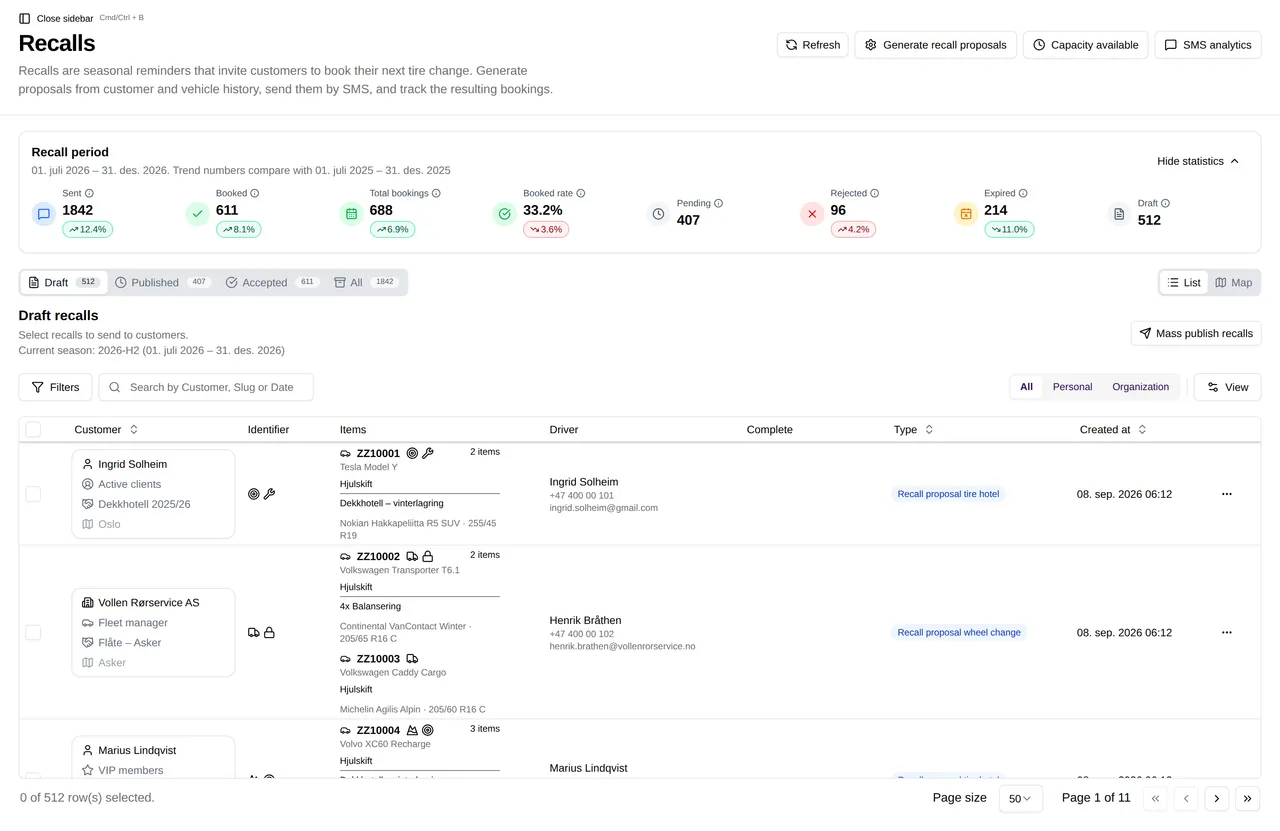
You can now run several recall (innkalling) campaigns in parallel from the partner portal. Each campaign has its own car list, its own SMS text and its own funnel. Cars can be excluded per adapter (the data source that feeds cars into a campaign), so a car that is already booked through one channel is not chased through another. From any open proposal you can resend the SMS in one click, and the funnel counts update live as customers open, view and book.
What it changes
The person running recall no longer has to finish the wheel-change wave before starting the storage-renewal wave. On Monday morning they launch both, plus a third for a workshop with spare capacity that week, and go on with the day. When a customer rings to say they never got the text, the operator opens the proposal and resends it from there. No hunting through an SMS log. When the same car sits in two adapters, the exclusion rule keeps it in one campaign only, so nobody gets two texts about the same tyres. The back office reads the funnel at 14:00 and knows which campaign needs a second push before the vans are booked out.
How it works underneath
Each campaign is stored as its own object with an audience, a message template and a send schedule. Cars enter a campaign through one or more adapters. Exclusion rules are saved per adapter per campaign, so removing a batch of cars from one campaign does not touch the others. Every send creates a proposal with a tracked link. Resending reuses the same proposal, so the funnel keeps counting the original car rather than creating a duplicate. Funnel counts are calculated from events as they arrive (sent, delivered, opened, booked) rather than from a nightly batch, which is why the numbers move while you watch. The same campaign view is available to Navio staff in the admin portal, so a support question about a campaign is answered from the data you are looking at.
A worked example
Take a regional tyre chain with eight workshops and roughly 25,000 cars in its tyre hotel (dekkhotell). The figures below are illustrative for a chain of this size, not results from a customer.
In the second week of September 2026 the chain opens three campaigns. "Winter 2026 wheel change" goes to all tyre hotel cars whose summer wheels are fitted. "Storage renewal 2026" goes to cars whose hotel contract expires before December. "Workshop C early slots" goes only to cars registered near one workshop that has thin bookings in week 39. The storage campaign excludes cars fed in from the wheel-change adapter, so a customer with an expiring contract who is also due a wheel change gets one text that covers both.
A chain of this size would typically see the wheel-change funnel show 20,000 sent and 12,000 to 14,000 opened within the first three days, with bookings building over the following two weeks. The storage campaign would typically run at a few thousand sends and a lower open rate, because the customer has no fixed date pressing on them. The workshop campaign is small, a few hundred cars, and its value is that the operator sees by Wednesday whether week 39 is filling and can resend to non-openers before the week is lost. Without parallel campaigns, the third campaign would have waited until the first two were closed, which is after week 39.
What it replaces
One campaign at a time. Exclusion lists kept in a spreadsheet and applied by hand. Looking up the SMS log to find and copy a link when a customer says the text never arrived.
How to use it
- In the partner portal, open Recalls. The season selector at the top shows which period you are working in.
- Choose Generate recall proposals. Proposals are built from customer and vehicle history.
- Review the drafts under the Draft tab and select the ones to send.
- Send by SMS. Sent recalls move to Published, and the ones that convert appear under Accepted.
- Use SMS analytics to see how the send is performing, and Capacity available to check you have the slots to absorb the bookings.
Who this is for
Tyre chains and tyre hotel operators who recall stored cars each season. Mobile tyre operators who run wheel changes from vans and need to fill specific weeks. Any operator whose autumn revenue depends on how many recalled cars turn into bookings.